Open-Motion Software Development
Overview
The Open-Motion software stack comprises three coordinated layers:
- Embedded firmware running on the cameras, aggregator, and console
- Host-side software running on the PC for device control, data acquisition, and visualization
- Test and validation utilities used in development, manufacturing, and QA workflows
Each layer is modular and open-source, allowing for extensibility and integration.
Licensing
All software developed on Openwater's main branch is licensed under the
AGPL. Hardware designs are released under
Creative Commons ShareAlike 4.0.
For the latest released version of the Open-Motion application, see the
openmotion-bloodflow-app
repository.
Tech stack
- PyQt 6.8 — desktop GUI framework
openmotion-sdk— Python SDK (repo)- SDK documentation lives at
openmotion-sdk/docs/
- Microcontrollers on the sensor modules and console
- Serial COM port protocol
- USB 2.0 HS
- PySerial 3.5
- libUSB 3.3.1
- PyUSB 1.3.1
The database is an active roadmap feature and is currently in development.
Tooling
| Category | Tools / Platforms |
|---|---|
| Version control | Git + GitHub |
| CI/CD (under development) | GitHub Actions |
| IDEs | STM32CubeIDE |
| Documentation | Markdown, .docx |
| Testing | Oscilloscope, logic analyzers, unit tests |
Database architecture
The database is an active roadmap feature and is currently in development.
Software architecture
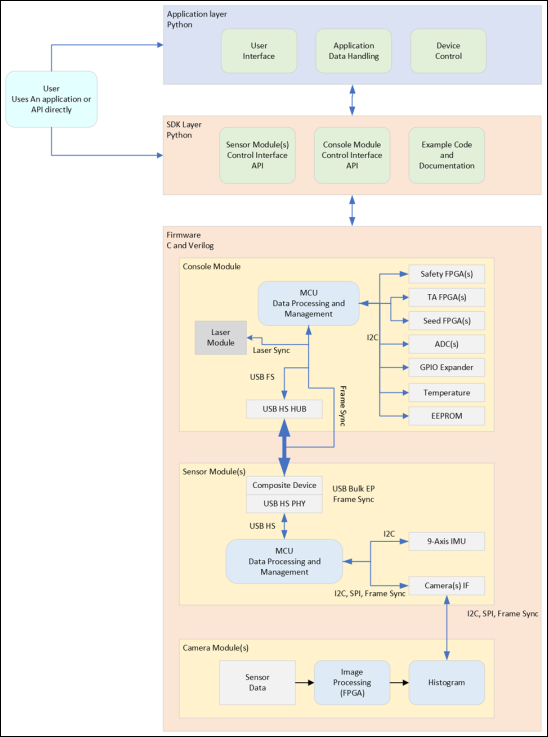
At a glance, the architecture flows:
Camera FPGAs ──► Aggregator MCU ──► Console MCU ──► Host PC
   (Verilog)       (STM32)            (STM32)        (Python SDK / PyQt6 app)
with control plane and safety interlocks managed by additional FPGAs and microcontrollers within the Console.
Embedded firmware layer
This layer includes all firmware running on hardware devices — cameras, aggregator, and console.
Camera Module FPGA firmware
| Hardware | Lattice FPGA |
| Repository | openmotion-camera-fpga |
| Function | Converts raw 2 MP grayscale image frames into 1024-bin histograms at 40 FPS |
| Interface | Outputs histogram data via SPI |
| Customizable | RTL (Verilog) can be modified for alternative processing methods |
Aggregator Board firmware
| Hardware | STM32 MCU |
| Repository | openmotion-sensor-fw |
| Function | Receives histogram data from 8 camera SPI inputs Aggregates and transmits data over USB HS Provides USB control endpoints for config and status |
| Interface | Outputs aggregated data and exposes a control/monitoring interface over USB |
Console firmware
| Hardware | STM32 MCU + USB hub + laser-control FPGAs |
| Repositories | openmotion-console-fwmotion-safety-fpgamotion-seed-fpgamotion-ta-fpga |
| Function | Generates FSIN sync pulses Triggers laser pulses with programmable delay Routes Aggregator data to the host PC Controls power, fan, and safety interlocks Provides a monitoring and control interface for the entire system |
| Interface | Outputs aggregated data and exposes a control/monitoring interface over USB |
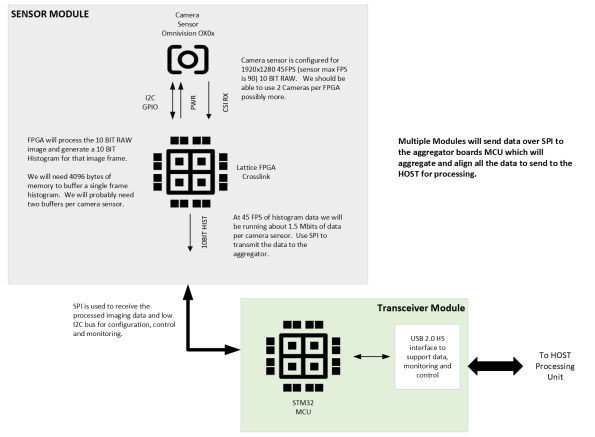
Sensor Module diagram
Host software layer
This layer runs on the PC and provides device control, data acquisition, and visualization.
Python SDK
| Repository | openmotion-sdk |
| Function | Enumerates and connects to aggregators and console Reads and parses 16-camera histogram streams Computes blood flow and volume metrics Provides real-time visualization and logging |
| Platform support | Current: Windows 11+ Future: macOS 12+, Linux |
| Extensibility | Open-source and modular (Python 3.12+) Integrates with NumPy, Pandas, Jupyter, and other scientific tools Example test scripts in openmotion-sdkAPI documentation in openmotion-sdk/docs |
Test & Validation utilities layer
These tools are used in development, manufacturing, and QA workflows.
Test Engineering Application
| Repository | openmotion-test-app |
| Framework | Python + PyQt6 |
| Function | Live preview of histogram data per camera Validate USB/SPI communication Inspect hardware status (version, ID, sync) Automate production tests |
Repository map
A consolidated view of all Open-Motion software repositories:
| Layer | Repo | Purpose |
|---|---|---|
| Firmware (FPGA) | openmotion-camera-fpga |
Camera-side histogramming |
| Firmware (MCU) | openmotion-sensor-fw |
Aggregator board firmware |
| Firmware (MCU) | openmotion-console-fw |
Console MCU firmware |
| Firmware (FPGA) | motion-safety-fpga |
Laser safety interlock |
| Firmware (FPGA) | motion-seed-fpga |
Laser seed control |
| Firmware (FPGA) | motion-ta-fpga |
Timing/aggregator FPGA |
| Host SDK | openmotion-sdk |
Python SDK |
| Host application | openmotion-bloodflow-app |
Reference blood-flow GUI |
| Test/QA | openmotion-test-app |
Test engineering tool |